One inbox for all your products.
Sales and support chat with an AI agent trained on your docs. Install it on every site you run, answer from a single inbox, and pay for chats instead of seats. Set up in minutes, not a sprint.
- 50 chats a month free
- No credit card
- Unlimited workspaces and teammates
Want to try it? The real thing is in the corner of this page.
Support tools were built for support teams. You are a team of one with three products.
Per-seat pricing, one dashboard per site, and an inbox that never sleeps. Svellyo flips it: one inbox for all your products, an AI that answers first, and a bill that only grows when your chats do.
22 KB
widget, gzipped
~1 s
to the first AI answer
1 line
to install anywhere
0
cookies set by the widget
Live before your coffee cools
Install in a minute
Paste the snippet or add the SDK. The widget is 22 KB, isolated in Shadow DOM, and sets no cookies.
Teach the AI
Write a few articles or import your docs and website. Set the tone, the handoff rules, and you are done.
Answer from one inbox
The AI resolves the routine questions. You handle the rest from a single inbox across every product you run.
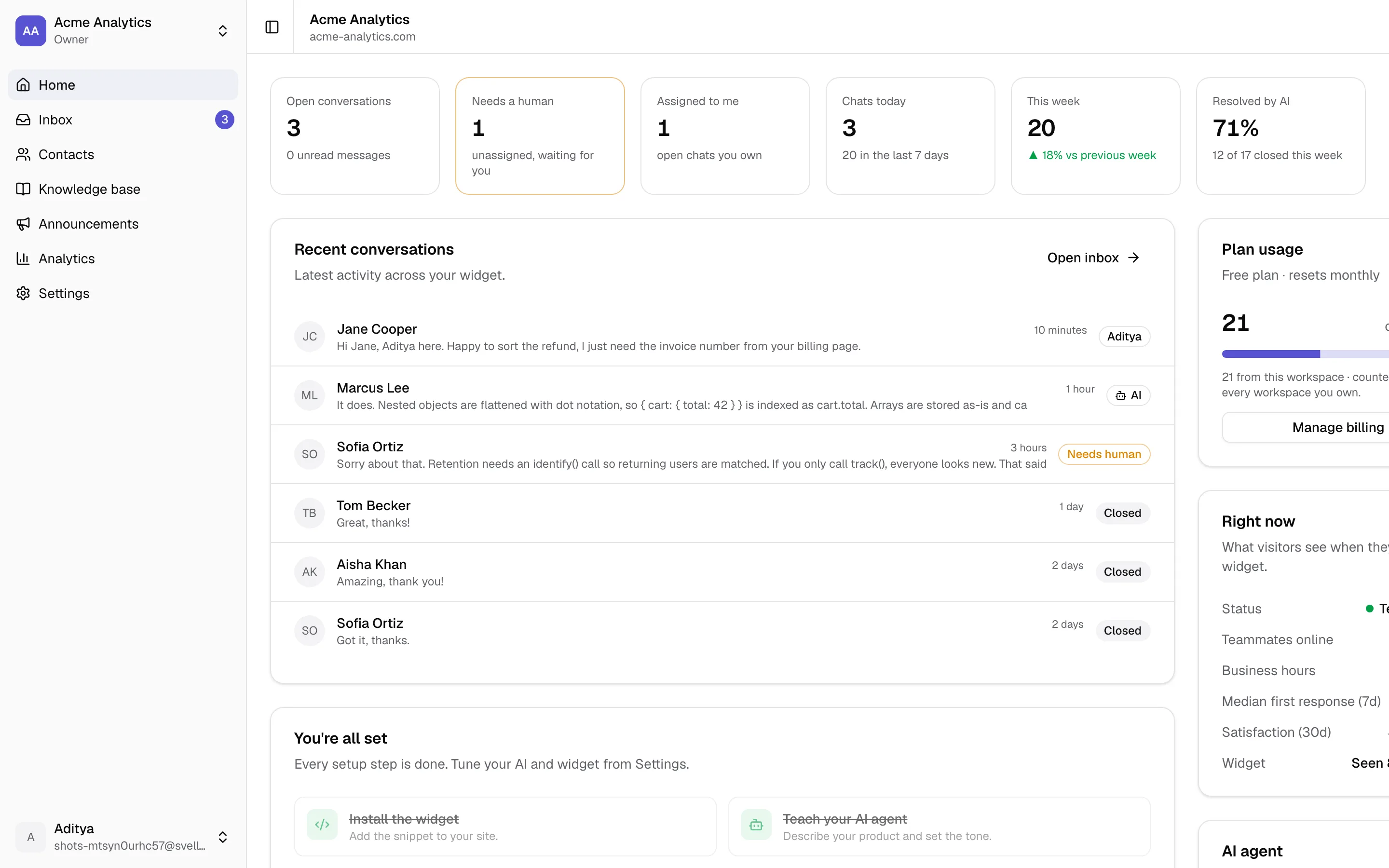
One account. Every product. One bill.
Create a workspace per product. Each has its own widget, branding, knowledge base and help center, so nothing leaks between them. You and your teammates are on all of them, and the switcher shows which one needs attention right now.
- Unlimited workspaces on every plan, including Free
- Open-conversation badges on every workspace in the switcher
- Chats are counted once across everything you own
- Invite the same people to every product without paying per seat
- Transfer a workspace to a teammate when a product changes hands
An assistant that knows when to answer and when to step aside
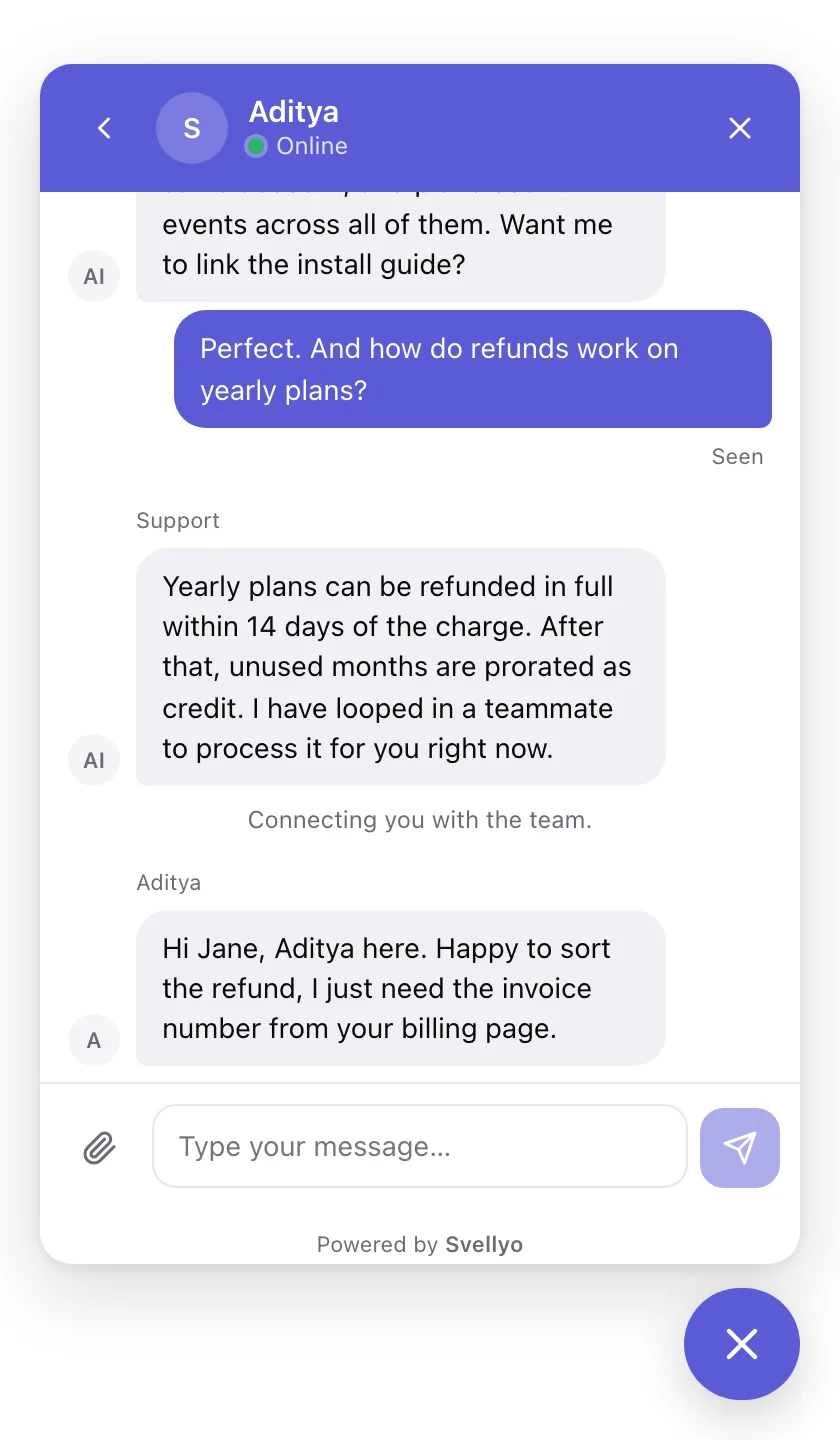
Most AI chat bots guess. Svellyo's agent answers strictly from your knowledge base, scores its own confidence, and brings a human in the moment it should. You stay in control of tone, limits and handoff rules.
- Answers only from your knowledge base, never invents pricing or policies
- Hands off to a human on low confidence, trigger phrases, or a visitor's request
- Collects the visitor's email when your team is offline so nothing is lost
- Replies in the visitor's language automatically
- Drafts replies for your team when a human takes over
- Shows which questions it could not answer so you know what to write next
Visitor · pricing page
Does the Scale plan include custom domains?
AI · 1.4 s96% confident
Yes, custom help-center domains are included on Pro and Scale. Add yours under Knowledge base → Help center.
Source: Pricing and plans
Visitor
I was charged twice this month.
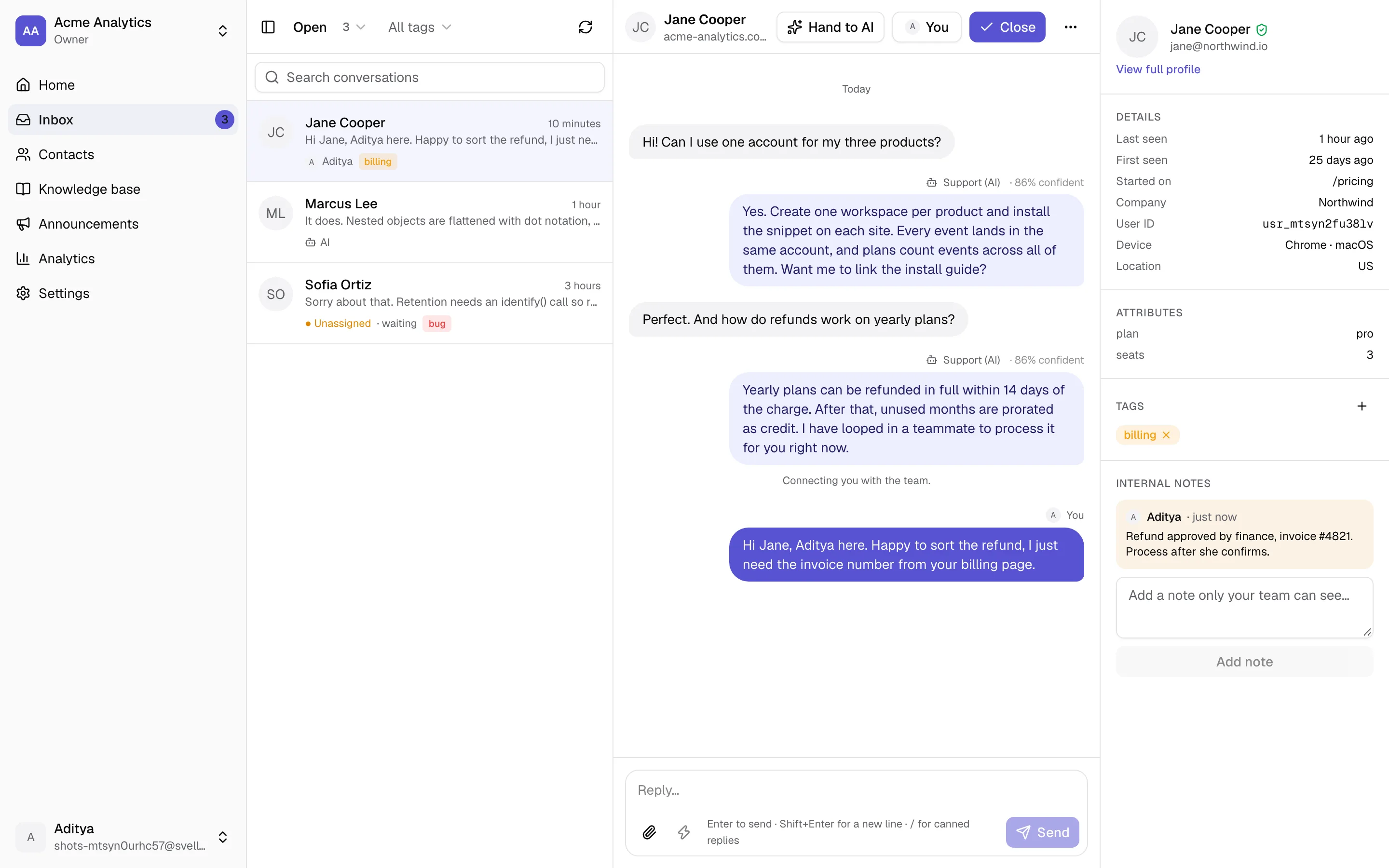
One inbox for every product you run
Each product gets its own workspace with its own widget, knowledge base and settings. Every conversation lands in the same place, and you switch between products in one click.
Unified inbox
Open, needs a human, mine, AI handling, closed. Filter, search and tag across every site you run.
Take over and hand back
Reply to any chat the AI is handling and it steps aside. Click hand back and it resumes with full context.
Assign, tag, note
Route chats to a teammate, label them for analytics, and leave internal notes the visitor never sees.
Canned replies and AI drafts
Type / for saved answers. Ask the AI to draft a reply from your docs, edit it, send it.
Chimes, badges, tab titles
A chime on new visitor messages, open counts on every workspace, unread count in the browser tab.
Realtime with a safety net
Messages appear instantly over websockets and are polled every 15 seconds as a fallback, so nothing is missed.
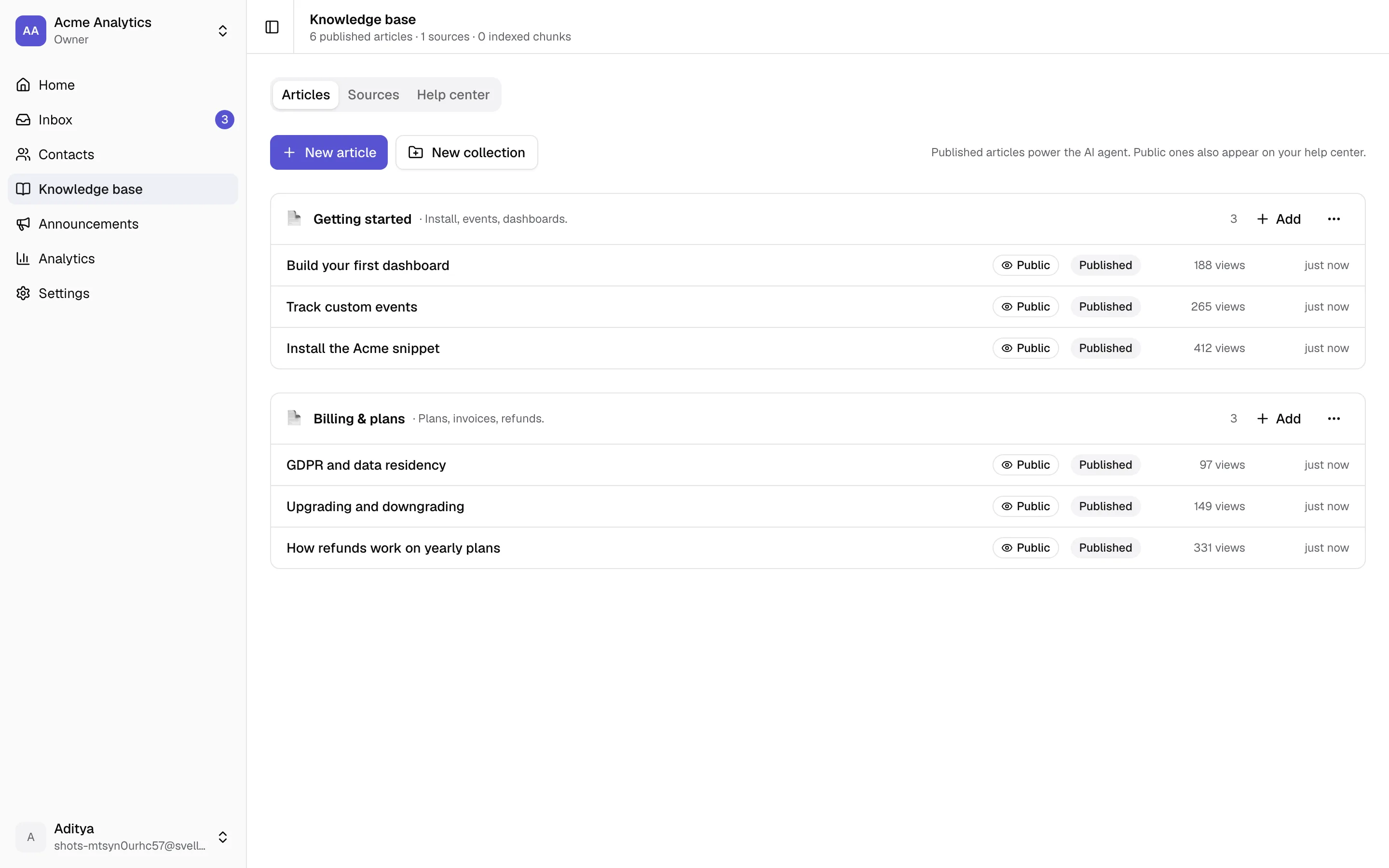
Write it once. The AI and your visitors both use it.
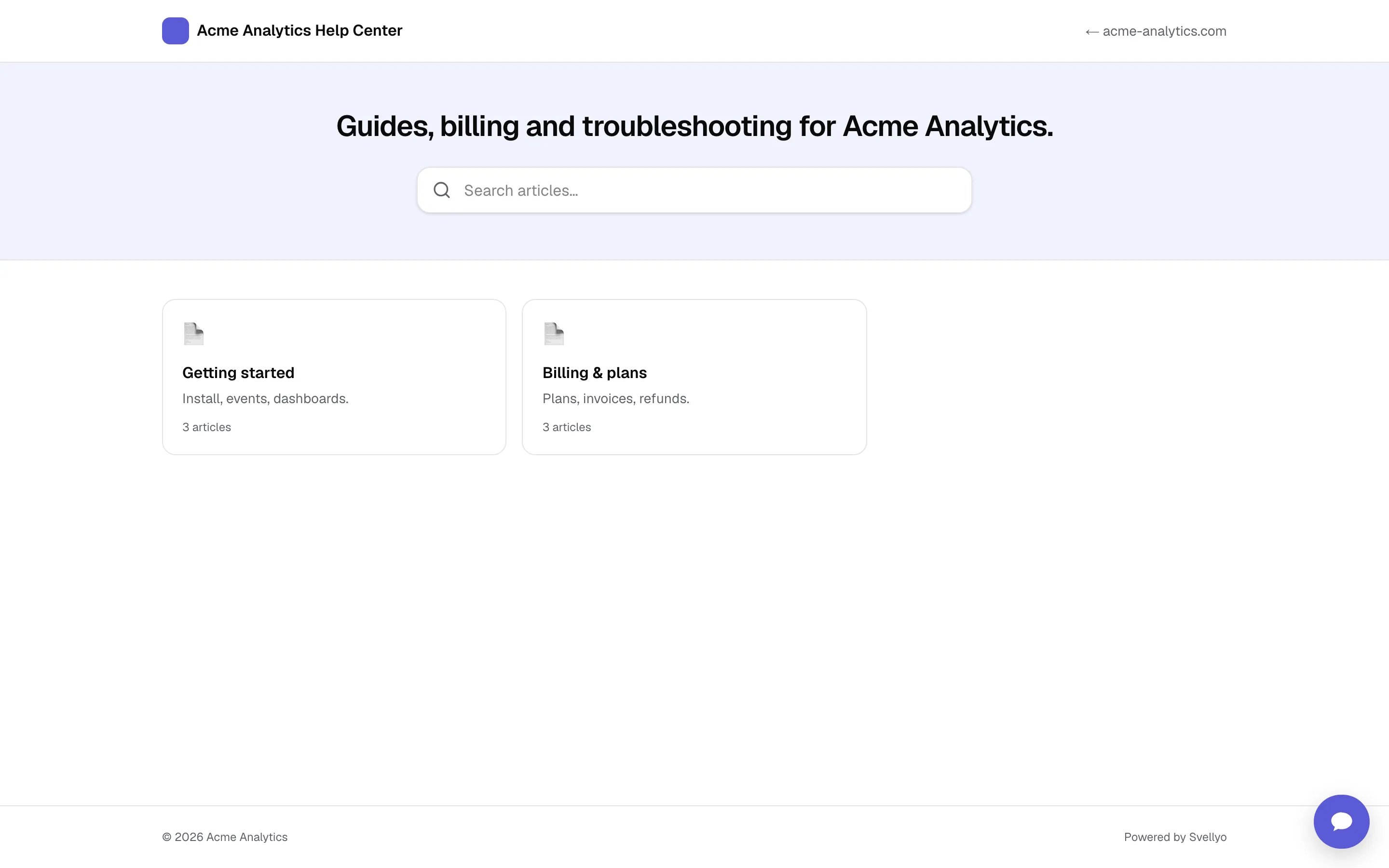
Articles, a website crawl and file uploads feed the agent. Public articles also become a searchable help center on your subdomain or your own domain, with the chat widget built in.
- Rich article editor. Headings, lists, code, tables and links. Paste Markdown and it converts. Collections keep things tidy.
- Website crawl. Point it at your docs or marketing site. It crawls, indexes and refreshes on a schedule.
- PDF, Markdown and text files. Upload manuals and policies. They are chunked and indexed like everything else.
- AI-only articles. Internal policies and exact numbers the AI should know but the public should not see.
- Help center on your domain. help.svellyo.com/you on every plan. Your own domain with a CNAME on Pro and Scale.
Know what people ask, and what to write next
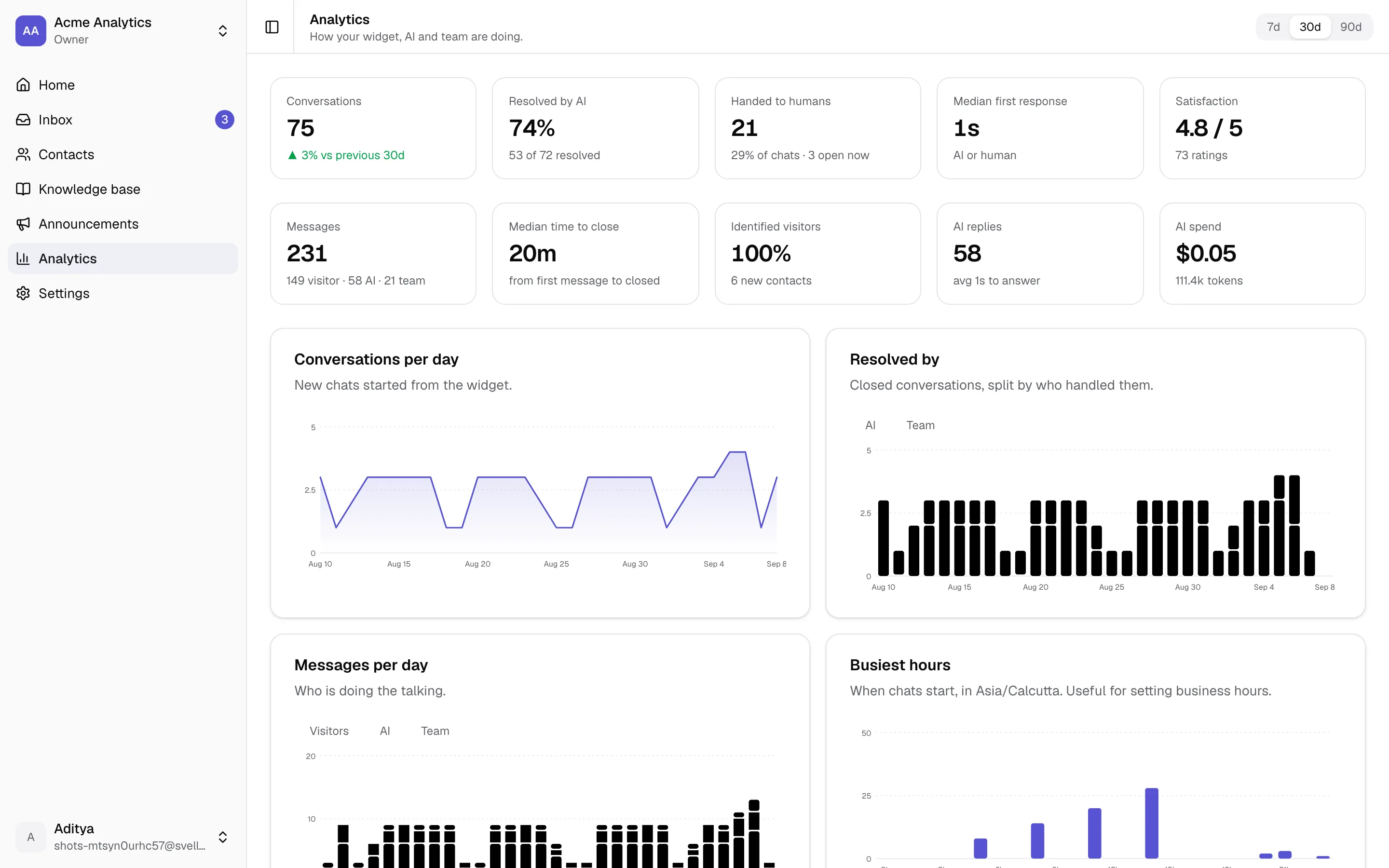
Every chart respects the same rule as billing: only real conversations count. See how much the AI resolves on its own, how fast you reply, when your visitors are awake, which pages start the most chats, and which questions the AI could not answer.
- Conversations, messages, resolutions and ratings per day
- Median first response and time to close
- Busiest hours in your timezone, to set business hours
- Top pages, tags and handoff reasons
- Per-teammate replies, handled chats and response time
- AI replies, tokens and spend
A widget that fits your site and stays out of the way
22 KB gzipped, isolated in Shadow DOM so your CSS cannot break it and it cannot break your page. No cookies. Themes, colours and behaviour are all live-previewed in the dashboard.
Four themes, any colour
Default, minimal, bubble or sidebar. Accent colour, light or dark, left or right, bubble or pill launcher.
Pre-chat form and suggested questions
Ask for name or email before the first message, and offer one-tap prompts your knowledge base answers well.
Proactive triggers
Open after a delay or on specific pages, once per visitor. Hide it entirely on admin, checkout or embed routes.
What's new tab
Post announcements from the dashboard. Visitors see a badge when there is something unread.
Attachments and ratings
Images and files up to 10 MB, a 1 to 5 rating when a chat closes, a chime on replies.
Business hours and away message
Show online during your hours, an away message outside them, and route to the AI or a message form when nobody is around.
Pay for conversations, not for seats or sites
Per-seat tools charge you for every teammate on every product. Svellyo counts chats once, across everything you own.
| Three products, three teammates | Per-seat, per-site tools | Svellyo |
|---|---|---|
| Workspaces | 3 subscriptions | Unlimited, one bill |
| Team seats | Billed per person, per product | Included |
| AI answers | Usually an add-on | Included on every plan |
| Help center | Extra tier | Included, custom domain on Pro+ |
| Remove branding | Top tier only | Pro and Scale |
| What you pay | Grows with every seat and site | $29/mo for 200 chats · $79/mo for 1,000 |
Who it is for
The solo founder with three products
You ship fast and support slow. Install the widget on every site, let the AI answer the repetitive questions from your docs, and open one inbox when a real person is needed.
- One plan covers every product
- AI handles pricing, install and how-to questions
- Chime on your laptop when someone needs you
The agency running client sites
Each client gets a workspace with its own branding, knowledge base and help center. Your team is on all of them without paying per seat per site.
- Workspace per client, one login
- Custom help center domains on Pro and Scale
- Assign chats to the right account manager
The small SaaS team
Two or three people, hundreds of customers. Identify signed-in users, see their plan next to every chat, and let the AI draft replies while you focus on the hard ones.
- identify() shows plan and account in the inbox
- Suggest reply drafts from your knowledge base
- Analytics tell you what to document next
Ship it in the time it takes to paste a line
A script tag for any site, a typed npm SDK for React and Next.js, and a ready-made prompt for Cursor or Claude Code. Identify signed-in users with a signed hash so nobody can impersonate a customer.
- Shadow DOM isolation, 22 KB gzipped, no cookies
- Per-workspace origin allow-list and signed identity
- Typed
@svellyo/sdkwith a React component andexcludePaths - Cursor or Claude Code? Copy one prompt and let it install
<script async src="https://cdn.svellyo.com/v1/widget.js" data-workspace="ws_your_id"></script>import { SvellyoWidget } from "@svellyo/sdk/react";
<SvellyoWidget
workspaceId="ws_your_id"
user={{ userId, email, name }}
excludePaths={["/admin/*", "/checkout"]}
/>Your data, your rules
Support conversations are personal data. Svellyo gives you retention windows, one-click export, contact erasure and encrypted secrets so you can honour requests without a ticket to us.
Encrypted at rest and in transit
Integration secrets and identity keys are encrypted. Sessions can be revoked from your account page.
Export everything
A contact's data or a whole workspace as JSON, whenever you want it.
Retention windows
Keep conversations forever, 90 days or a year. A daily job purges what is out of window, attachments included.
Cookie-less widget
One token in localStorage, no third-party trackers, nothing to add to your cookie banner.
Roles and seats
Owner and member roles per workspace. Seats are per workspace, so the same people can join every product.
Nothing is deleted for billing reasons
Over your limit, the AI pauses and the widget collects messages. Your team keeps replying, and everything resumes next month.
What is coming next
Svellyo is built in the open by a maker for makers. Here is what is on the bench.
Mobile app for iOS and Android
The inbox in your pocket with push notifications, takeover and hand back, and workspace switching.
Browser push notifications
Get notified about new and escalated chats even when the dashboard tab is in the background.
More integrations
Notion and Google Docs as knowledge sources, Linear and GitHub issue creation from a conversation.
Public API and outbound webhooks
Build on top of your conversations and contacts from your own systems.
Notes for makers who do their own support
September 9, 2026 · 8 min read
Add live chat with an AI agent to a Next.js app in 10 minutes
A step-by-step walkthrough: install the widget in the App Router, identify signed-in users securely, hide it on admin routes, and let an AI answer from your docs before you wake up.
September 8, 2026 · 7 min read
Per-seat pricing punishes small teams. Here is why we price by chats instead.
Support tools bill you for every teammate on every site. That model was designed for support departments, not for a founder with three products. How Svellyo counts a chat, what it costs, and what we deliberately left out.
September 7, 2026 · 8 min read
How to write a knowledge base your AI support agent can actually use
Retrieval, not prompting, decides whether an AI agent answers well. Eleven practical rules for articles, crawls and files, learned from watching where the agent got it wrong.
Questions makers ask
- What counts as a chat?
- A conversation counts once per calendar month when a visitor sends a message or asks for a person. AI drafts, internal notes and your replies never count. Opening the widget without writing does not count either.
- Do I pay per website or per teammate?
- Neither. Limits apply to your account and are shared across every workspace you own, so adding products or inviting your co-founder costs nothing extra.
- What happens when I hit my limit?
- The AI pauses and the widget switches to a leave-a-message form. Your team can still reply to everything. Nothing is deleted, and it all resumes on the first of the next month or the moment you upgrade.
- Can I turn the AI off, or make it hand off sooner?
- Yes, per workspace. Set a confidence threshold, trigger phrases, a maximum number of AI replies, or disable it entirely and run a classic live chat.
- Does it work inside my app for signed-in users?
- Yes. Call identify() with the user's id, email and any attributes. Every conversation then shows who you are talking to, and their history follows them across devices. Sign the id with your workspace secret to prevent spoofing.
- Can I hide the widget on some pages?
- Yes. Pass excludePaths in the SDK, data-exclude on the script tag, or set the paths in the dashboard without a redeploy. It re-checks on client-side navigation in Next.js and React apps.
- Does the AI cost extra?
- No. AI replies are included on every plan, including Free. You can see spend per workspace in Analytics, and there is a daily cap as an abuse guard.
- Where does my data live and can I leave?
- Postgres on Neon with encryption at rest. You choose a retention window, can export everything as JSON, and erase individual contacts on request.
- I am on Crisp or Intercom. How hard is it to switch?
- Install the snippet next to your current widget, import your help center articles by pasting them in, and turn the old one off when you are happy. Most makers do it in an afternoon.
- Does it work with Webflow, Framer, Shopify or WordPress?
- Yes. Anything that lets you add a script tag works, and there is a WordPress snippet for functions.php. React and Next.js get a typed npm package.
- Is there a free plan?
- Yes: 50 chats a month, unlimited workspaces, the AI agent and a public help center. No card required.
- Can I cancel any time?
- Yes. Cancel from your billing page and you keep paid features until the end of the period, then drop to Free. No emails, no calls.
More answers in the help center.
Give every product great support tonight
Create a workspace, paste the snippet, publish one article. Your first 50 chats a month are free, forever.
Create your workspace